

Engine-grade telemetry, FTC, mass and AI maintenance in one OBx subscription.
OneRoad OBx adds a plug-in telematics device and heavy-vehicle adapter kit to your OneRoad platform — so EWD, tracking, maintenance, mass, FTC and AI all run off the same live data stream.
FTC and TCA features subject to final ATO Class Ruling and TCA approvals.
Everything in OneRoad — then OBx turns it into a full telematics stack.
OBx is for fleets that want more than an app. You get the NHVR-approved EWD and live fleet tools you already know, plus a rugged device in every truck for engine-grade data, FTC and mass intelligence.
- NHVR-approved EWD & Visual Fatigue Clock
- AI Journey Planner with rest stops mapped in
- Live Tracking & fleet status dashboard
- Maintenance Management & defect workflow
- Mass Management & Live Loading visibility
- Runsheets & TMS-style trip planning
Ruggedised OBx device plus heavy-vehicle adapter kit, installed in each OBx truck.
- GPS direct from the vehicle, not just the phone
- Engine & CAN signals (vendor-dependent)
- Ignition, movement and utilisation patterns
- OBx QR for fast activation and changeover
OBx structures your records for auditors, not spreadsheets.
- High-resolution GPS & engine state
- On-road / off-road & auxiliary tagging
- Quarterly FTC summaries & detailed exports
- JSON / CSV files aligned with TCA & ATO schemas
Everything you need in one OBx box.
Every vehicle gets a complete DIY kit — so rollout is predictable, consistent and fast. Send a box to a depot, give it to the workshop, or hand it straight to the driver.
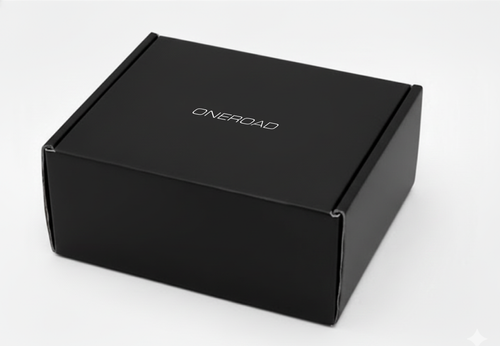
Premium OBx packaging
Individually labelled kit per vehicle with QR-linked quick start and device ID for clean asset tracking.
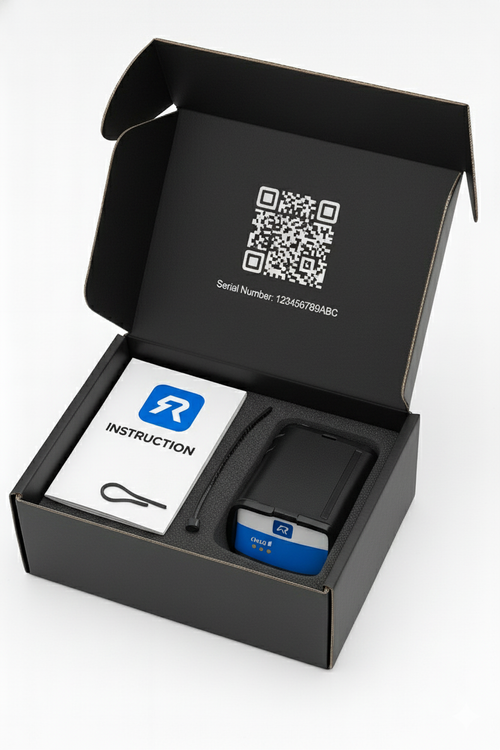
Everything in its place
OBx device, adapter harness, cable ties and a one-page install guide — so anyone can fit it in under a minute.
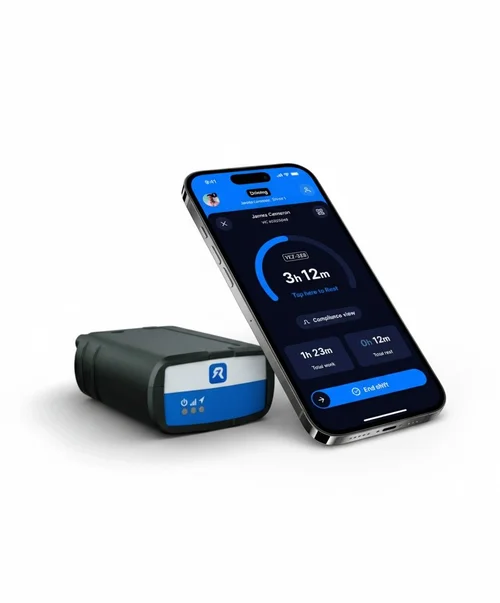
OBx device
Rugged, compact hardware with 16-pin socket and LED status — built for Australian linehaul and local work.
One OBx device, three adapters – built for Australian heavy vehicles.
Heavy vehicles don’t use a standard car OBD-II port. Every OBx kit ships with a device and adapter harnesses so you can connect to all major truck types in Australia.
- ✔ OBx device with 16-pin female socket
- ✔ J1939 9-pin adapter for Kenworth, Freightliner, Western Star, Mack, International and others
- ✔ Scania 16-pin adapter for Scania trucks
- ✔ FMS 12-pin harness for OEM FMS connectors (e.g. Mercedes-Benz and others)
Installation is plug-and-play for most vehicles. FMS installs may use your usual auto-electrician — OBx is designed to fit into existing workshop workflows.
Start with a pilot, then scale up.
- ✔ Begin with a small group of vehicles and depots
- ✔ Validate data for FTC, mass & maintenance use cases
- ✔ Standardise installation and changeover steps
- ✔ Roll out to the rest of the fleet once you’re comfortable
One OBx device feeds fatigue, FTC, mass and maintenance together.
Instead of four separate systems, OBx ties everything back to the same engine and location data — so you can defend decisions across fatigue, fuel, mass and workshop records.
Fatigue & EWD
Drivers keep using the OneRoad EWD with Visual Fatigue Clock & AI Journey Planner. OBx adds hardware GPS and ignition to support breach investigation and CoR evidence.
Fuel Tax Credits (FTC)
Engine state + GPS is used to separate on-road, off-road and auxiliary running. OBx then produces accountant-ready FTC exports each quarter.
Mass & OBM pathway
OBx records movement, location and time so your RightWeigh / SmartOBM readings sit inside a TCA-aligned data model for future Type 2 OBM solutions.
Maintenance & AI Mech One
Blend pre-starts and defects with OBx engine/usage patterns. AI Mech One flags potential issues and prioritises work for the workshop.
From install to live AI dashboard in a few simple steps.
Order OBx for selected vehicles
Choose which vehicles join the OBx plan. Kits are labelled per rego so dispatch and workshops know where each box goes.
Plug in, cable-tie, scan QR
Plug OBx into the adapter, connect to the truck port, cable-tie for tamper resistance and scan the QR to link it to the vehicle record.
Drivers just keep driving
Drivers continue using the same OneRoad app. Behind the scenes, OBx sends engine, movement and location into your AI dashboard.
No new driver training. No parallel systems. OBx simply deepens the data behind the tools you already use.
FTC reporting built on real engine and GPS data.
OBx captures the data you need to build defensible Fuel Tax Credit claims – using engine state, GPS and usage patterns instead of rough estimates and spreadsheets.
Capture engine & movement data
The OBx device records when the engine is on, when the vehicle is moving and where it is in real time, alongside ignition and telematics events.
Classify on-road vs off-road activity
GPS traces are used to separate public road usage from off-road and auxiliary activity, following the structures used in existing ATO Class Rulings.
Generate FTC-ready summaries
Summaries and detailed files are produced so your accountants or advisors can prepare FTC claims backed by clear, structured OBx data.
Final FTC claim calculations remain between you and your tax advisor. OneRoad focuses on providing consistent, high-quality data designed for an ATO Class Ruling.
OBx data designed for the TCA ecosystem.
OBx data structures are being built to align with TCA’s telematics and OBM requirements, so you’re ready to participate as approvals and schemes evolve.
- ✔ High-resolution position and speed records
- ✔ Consistent device IDs and vehicle mapping
- ✔ JSON and XML outputs aligned to RIM / OBM schemas
- ✔ Designed as a pathway to future Type 2 OBM solutions
OBx does not claim current TCA certification. It is designed as a data and integration pathway as approvals are sought and granted.
Use the same platform as compliance evolves.
- ✔ Keep drivers on the same OneRoad app
- ✔ Add or upgrade hardware without changing systems
- ✔ Align mass, fatigue and telematics data in one place
- ✔ Reduce re-training and re-implementation costs
When to stay on OneRoad software only and when to move to OBx.
OneRoad (cellular only)
- ✔ EWD, Tracking, Maintenance, Mass, TMS & AI Journey Planner
- ✔ No hardware install required
- ✔ Great for fleets focused on fatigue & NHVAS evidence
- ✔ Lower setup effort and cost per vehicle
- ✔ Ideal as a stepping stone into OneRoad
OneRoad OBx (hardware + cellular)
- ✔ Everything in OneRoad, plus OBx device per truck
- ✔ Engine & CAN data for deeper maintenance insight
- ✔ GPS from the truck itself for FTC and OBM use cases
- ✔ Data model aligned to ATO FTC and TCA Type 2 OBM pathways
- ✔ Best for fleets with serious compliance and tax requirements
Common questions about OneRoad OBx.
Do drivers need to learn a new app for OBx?
No. Drivers keep using the same OneRoad EWD app. OBx sits in the vehicle and feeds extra data into your existing dashboard.
Who installs the OBx device?
You can use existing workshop staff, your auto-electrician or a trusted contractor. The kit is designed so anyone comfortable with truck wiring can install it.
What happens if the truck loses mobile coverage?
OBx buffers data while offline and uploads when coverage returns. The driver app also continues logging offline so your EWD records stay intact.
Can I run some vehicles on OBx and others on software-only?
Yes. Many fleets start with a mixed model — OBx for high-value / high-risk vehicles, and software-only for the rest. Everything still appears in one dashboard.
Is OBx already TCA Type-approved and ATO Class-ruled?
OBx is being built to align with TCA and ATO requirements, and to support a future Class Ruling and Type-approval process. Until final sign-off, you should continue to rely on your own tax and compliance advice.
Start with a small OBx pilot.
Pick a handful of vehicles and routes, install OBx and confirm the data matches what you and your advisors need. Once you’re happy, scale up across the fleet.
Ready to explore OneRoad OBx?
We’ll walk you through the OBx hardware kit, installation approach and data outputs for FTC, mass and maintenance — and help you decide which vehicles should go first.